FreeDon't want to build it yourself? We'll build your pre-landers.Have us build it for you →
Downloads

Page kits you run on your own servers

Each kit is plain HTML, CSS and JavaScript with one settings file. No build step, no trackers, nothing to install. Open a page from your disk to see it work, then put it on any host.

The kits

Pick the kit for your traffic. Every kit hands the visitor to our cash offer page with the address filled in, and none collects a name, phone or email.

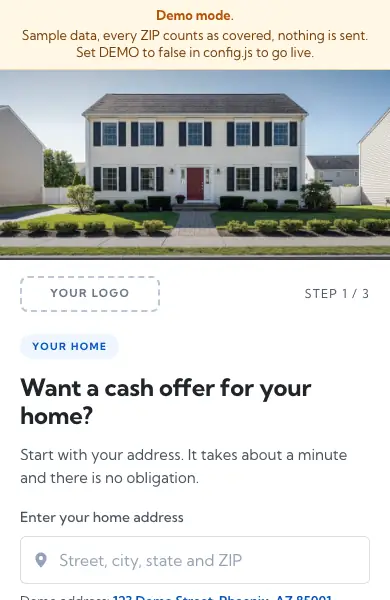
First screen of the Meta pre-lander kit in demo mode: a sample house photo, a Your logo box and the address box

For Meta and paid social

Meta pre-landers

Three pre-lander styles that qualify the visitor, capture the address, show the house and hand off.

Who it is for: Partners running Meta or other paid social traffic to cold visitors on phones. Read the Meta guide first.

What is inside
  • Three styles: address first, a quick quiz, and search and found
  • An exit page with a slot for your own alternative offer
  • config.js, the one settings file
  • A README with setup, testing and compliance checklists
  • The licence

See it working: click through the live example, with notes on every button and field.

File
shf-meta-prelanders.zip
Size
Listed in the kit manifest
SHA-256
Listed in SHA256SUMS.txt
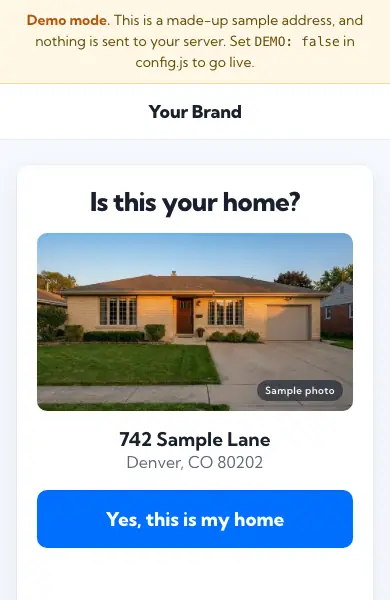
First screen of the Confirm your home kit in demo mode: Is this your home, a sample house photo, a sample address and the Yes button

For text and email

Confirm your home

One small page for visitors whose address you already know. It shows the address and asks for one confirm tap, then hands off.

Who it is for: Partners sending text messages or email about a specific home. Read the text message guide or the email guide first.

What is inside
  • The confirm page and its "Not my home" exit page, one stylesheet, one script, one placeholder photo
  • A settings file for your tracking link, brand and policy links
  • A README with setup, testing and compliance checklists
  • The licence

See it working: the live example from a text or from an email, with notes on every part.

File
shf-confirm-home.zip
Size
Listed in the kit manifest
SHA-256
Listed in SHA256SUMS.txt
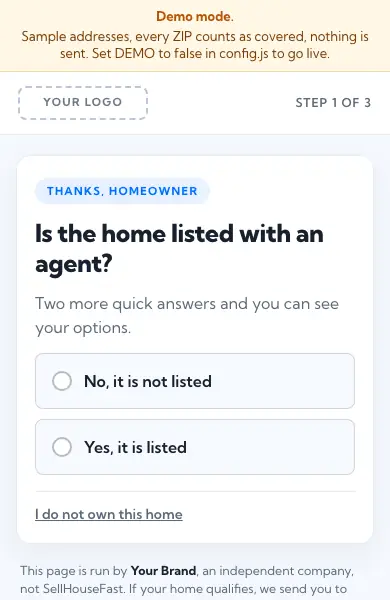
First screen of the Path bridge kit in demo mode: the listed with an agent question

For path and survey traffic

Path bridge

Path bridge: one-step bridge for path and survey traffic.

Who it is for: Partners buying path or survey traffic, where the visitor has just answered questions on someone else's site. Read the path guide first.

What is inside
  • The page in plain HTML, CSS and JavaScript
  • config.js, the one settings file
  • A README with setup, testing and compliance checklists
  • The licence

See it working: click through the live example, with notes on every button and field.

File
shf-path-bridge.zip
Size
Listed in the kit manifest
SHA-256
Listed in SHA256SUMS.txt
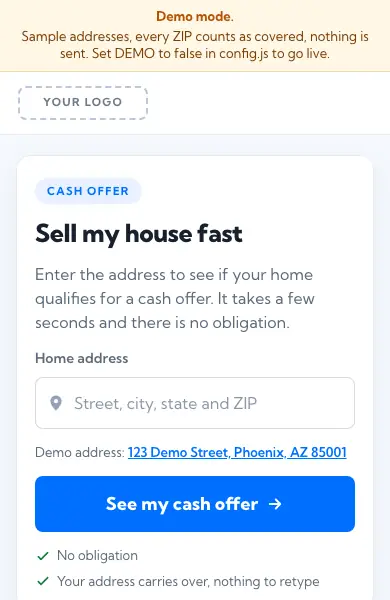
First screen of the Search landing kit in demo mode: the Sell my house fast headline, the address box and the See my cash offer button

For search traffic

Search landing

Search landing: one-screen keyword-matched landing that hands straight off.

Who it is for: Partners running search ads, where the visitor typed what they want. Read the search guide first.

What is inside
  • The page in plain HTML, CSS and JavaScript
  • config.js, the one settings file
  • A README with setup, testing and compliance checklists
  • The licence

See it working: click through the live example, with notes on every button and field.

File
shf-search-landing.zip
Size
Listed in the kit manifest
SHA-256
Listed in SHA256SUMS.txt
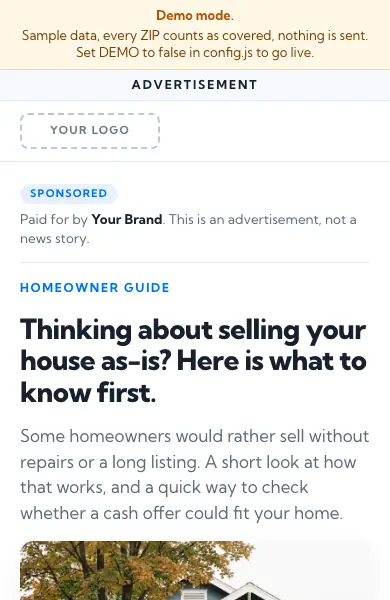
First screen of the Native advertorial kit in demo mode: an advertisement label, the sponsor line and the article headline

For native and display

Native advertorial

Native advertorial: article-style pre-lander for native and display.

Who it is for: Partners testing native or display traffic, where the visitor was reading something else. Read the native guide first.

What is inside
  • The page in plain HTML, CSS and JavaScript
  • config.js, the one settings file
  • A README with setup, testing and compliance checklists
  • The licence

See it working: click through the live example, with notes on every button and field.

File
shf-native-advertorial.zip
Size
Listed in the kit manifest
SHA-256
Listed in SHA256SUMS.txt

How to run a kit

  1. Download and check

    • Download the kit.
    • Compare the file's fingerprint with the one on this page. The command is in Verify your download.
  2. Open it from your disk

    • Open a page from your disk. Every kit starts in demo mode, with fictional sample data and a banner that says so.
    • Walk every path, including each "not a fit" answer.
  3. Fill in the settings

    • Fill in the settings file: your brand name, tracking link, Terms and Privacy links and disclaimer.
    • Swap the "Your logo" box for your logo.
  4. Build your server side

    • Build your server side. The pages call routes on your own server for addresses, house pictures and events.
    • Set demo mode off only when those work.
  5. Test, then ask us

    • Send one test lead and check our page opens with the address filled in.
    • Send us your page link before you spend.

Settings you change

Everything lives in one file, config.js. These are the Meta kit's settings; each kit's README lists its own.

DEMO
On while you look around: sample addresses, sample house photos, every ZIP counted as covered, no redirect. Turn it off to go live.
BRAND_NAME
Your company name, shown in the "who you are dealing with" line on every page.
TRACKING_LINK
Your tracking link for the SellHouseFast offer. The kit adds sub1, sub2, sub3 and the address.
EXIT_URL
Where visitors who are not a fit go (listed, not the owner, just browsing). The kit's own exit page, or yours.
COVERAGE_MODE
'accept-all', the default: every address is handed off, and when a coverage list loads the events only record covered: true or false. 'exit-uncovered' is the stricter option: an address outside the list goes to the exit page.
ALLOW_CONTACT_FIELDS
false, the default: the kit removes name, phone and email fields from the hand-off link. true passes firstName, lastName, phone and email through when your link already carries them; the kit never asks for them. Accepted, strongly discouraged: those details then sit in browser history, logs and analytics on both sides, and our page collects them under its own consent text anyway.
All settings
ADDRESS_ENDPOINT
Your server's address suggestion route. Your provider key stays on your server.
HOUSE_IMAGE_ENDPOINT
Your server's house picture route. The sample house photo shows when there is no picture.
COVERAGE_CSV_URL
Optional. Your hosted copy of the county or ZIP list from the coverage site. When it loads, the events carry covered: true or false.
TERMS_URL, PRIVACY_URL
Your own real policies.
DISCLAIMER
Your disclaimer, approved by your own counsel.
TURNSTILE_SITE_KEY
Optional Cloudflare Turnstile check on the confirm tap. Empty means skipped.
MIN_SECONDS_ON_PAGE
The confirm tap only counts after this many seconds on the page.
EVENT_HOOK
One function, called for prelander_view, qualified, address_confirmed and handoff. Wire it to your pixel and your logger.

What you still build yourself

The kits are the front end only. Your server does the work that needs keys, logs or a judgement about bots.

Licence

Free to use, copy and change, only to promote SellHouseFast offers

The kits are free to use, copy and change, but only to promote SellHouseFast offers. The one exception is the alternative offer box on the exit page, which is yours to fill. They come with no warranty. You are responsible for your own pages, ads and policies.

The full text is in LICENSE.txt inside each kit. Your partner agreement with us still applies.

Verify your download

A checksum is the file's fingerprint. If yours matches the SHA-256 on the kit's card, the file is exactly the one we published.

On a Mac or Linux, in the folder you downloaded to:

shasum -a 256 shf-meta-prelanders.zip

On Windows, in Command Prompt:

certutil -hashfile shf-meta-prelanders.zip SHA256

Or download SHA256SUMS.txt into the same folder and check every kit you downloaded at once with shasum -a 256 -c --ignore-missing SHA256SUMS.txt. Each kit is also scanned before release for keys, internal addresses and tracking tags.

Done for you

Have us build it for you

Tell us a little about you. We'll email you to take it from there. It's free.

What do you want built?

Prefer email?