
Text message (SMS)
The visitor got a text about a home you already know. Your page does not need to sell anything. It needs one real tap that says "yes, this is my home", then it hands them to our page with the address filled in.
Who just tapped, and what happens next
Warm, on a phone, and about their own home
A text is personal. It reached them because they gave consent somewhere, and it names a home they know. That buys you attention, and it also means a careless text feels like an intrusion.
- State of mindGlancing at a notification. Mildly curious, a little wary of a link.
- What they knowWho texted them and that it is about their home. Nothing about SellHouseFast yet.
- IntentMedium. They will tap if it looks safe and relevant.
- Your first jobShow them their own home and get one honest tap.
The funnel, step by step
You already know the address, so there are no questions to ask and no address to type. The only thing your page must earn is the confirm tap. Pick a step to see its screen.
Screen 1 of 4: a text message from Your brand with a link preview that asks: Is this your home?.
The text Your text
Use approved copy from the Creative Center text pack. Name your brand, keep it calm, and end every message with "Reply STOP to end". The link carries a random token, never the address itself.
One screen: "Confirm your home" Your page
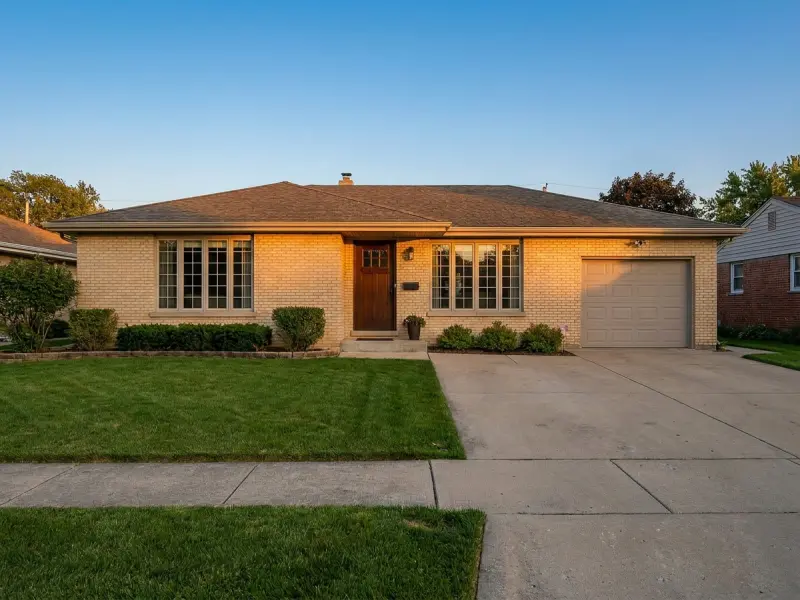
A picture of the house, the address, one question, "Is this your home?", and one big button: "Yes, show my offer" (our kit says "Yes, this is my home"). The tap on that button is the real human action. A "Not my home" link goes to a short exit page. Nothing counts until the tap.
Hand-off Your page
The tap sends the visitor to your tracking link with
street,city,stateandzipadded.Our page finishes the job SellHouseFast
Our page shows the house, asks the last questions, collects name, phone and email under our consent text, verifies the phone with a text code, and sends the lead on.
What works, and how sure we are
Text is a strong channel when it is run cleanly. The biggest trap is counting clicks that no person made.
| Tactic | How sure | What we know |
|---|---|---|
| Text brings real volume | Proven in our data | Text is one of our largest partner channels by lead volume. |
| Text is a strong channel when it is compliant | From our experience | Our team's view from running it. The volume is measured; "strong" is a judgement, not a measurement. |
| Expect many clicks that are not people | Proven in our data | A large share of clicks on text links come from computers that scan links, not people. Plan your reporting around that. |
| Require a real tap before anything counts | From our experience | Phones and carrier preview services open links on their own. Count the confirm tap, never the raw click. |
| Put a house picture in the link preview | From our experience | Our team saw click-through improve when the preview showed a house. Not measured in a controlled test. |
| Show a street picture of their own home | From our experience | Seeing their own home makes the message feel relevant. Street imagery costs climb fast at scale, so cache it. |
| One-tap "YES" confirm pages with the address hidden in a token | Untested | We have only just started running pages like this. No results yet. The kit below is built this way, so you can test it. |
When you already know the address
Your list has the address, so do not make the visitor type it. But do not put it in the link either: texts get forwarded, and links end up in browser history, server logs and analytics.
Use a token, not personal details, in links. Give each message its own random token. When the visitor opens the page, your server looks the token up and finds the address. Make it random, single-use where you can, at least 16 characters, and let it expire after a few days. Never build it from the data itself.
https://confirm.yourbrand.com/?t=k3J9xQ2mP7vL8wRt- Your server returns only
street,city,state,zipand, if you have them,latandlng.
- No counting the token lookup as a visit. Link scanners trigger it too.
The link preview image
The picture and title the phone shows under your text before anyone taps. For many people it decides whether they tap at all. Phones build it from three meta tags in your page's head; the kit has them, you fill in the values.
- og:title
- A short question, such as "Is this your home?".
- og:description
- One calm line saying who you are.
- og:image
- The full web address of a house picture. Wide format, about 1200 by 630 pixels, small and fast to load.
Do and do not for the preview
The preview fetch comes from a machine, not the visitor. Serve it quickly, log it if you like, and never count it as a click.
- Use a house picture. A picture of their own home, from your image route, is best. A friendly generic house is a fine fallback.
- Keep the title and description the same as the message promise. No surprises after the tap.
- Test it: send the link to your own phone and look at the preview before you send to a list.
- No address, name or other personal details printed on the image or in the title. Previews show on lock screens.
- No price, dollar figure or urgency on the image.
The hand-off link
After the confirm tap, your page sends the visitor to your tracking link with the address added. The kit builds it for you.
Tracking for text
- sub1
- The source. Use
sms. - sub2
- Your own click ID. Tie it to the accepted confirm tap, not the raw click, so it matches a real person.
- sub3
- The list or message code, so you and we can see which list and which message earn.
Events the kit fires: prelander_view when the confirm page loads, address_confirmed on an accepted tap, and handoff just before the visitor leaves for our page. The sold-lead event comes back to you from our postback. The full list is on the tracking page.
Compliance must-haves for text
Text messaging has strict rules, and they differ by state. This is the list as we understand it. Confirm each point with your counsel before you send.
- Required Consent to receive texts exists before you send, from the person you are texting. Confirm with your counsel what that consent must say.
- Required Send under the brand where the consent was given, and name that brand in the message.
- Required Every message ends with "Reply STOP to end". Honor STOP straight away, and honor it across all your channels, not only text.
- Required No raw or purchased lists.
Four more rules
- Required Send only inside the allowed hours for the recipient's local time. Confirm with your counsel which hours apply in each state you send to.
- Required Register your sending numbers and your messaging campaign with the carriers before you send.
- Required No personal data in links. Use a token, as described above.
- Required Approved copy only: no urgency, no money-stress lines, no promises about timing or fees.
The full review list is on the compliance page. Ask us to review your message and confirm page before you send.
Download the Confirm-your-home kit
One working confirm page, an exit page and one settings file, in plain HTML, CSS and JavaScript. It reads the token, asks your server for the address, shows the house, and only hands off after a real tap. The same kit works for email.